Your bank shows POS DEBIT, but you remember paying a café or ordering something online. Start with the full transaction details, then find the receipt. This guide pairs a fictional bank entry with a receipt and shows how a tip, pending authorization or unfamiliar billing name can affect what you see.
What does POS debit mean?
For a $0 entry labeled Visa provisioning service, see the card-verification guide. It shows a fictional setup record and explains what to ask your issuer about a wallet enrollment or unfamiliar request.
POS means point of sale: the checkout where a purchase is paid for. On a bank statement, POS debit generally refers to a debit-card purchase funded from the linked account. Helcim’s POS payment guide describes card purchases made at a checkout counter or online.
The bank may show a short description first and more detail when you open it. Read the merchant name, amount, date and status together. If you used the card online, compare the entry with your online order receipt; a POS label alone leaves the physical location of the purchase unclear.
For the broader purchase process, see the debit-card buying guide. If the account entry instead uses a generic DDA label, our DDA debit guide explains how to identify the underlying payment method.
Match a POS debit to a receipt: a $48 example
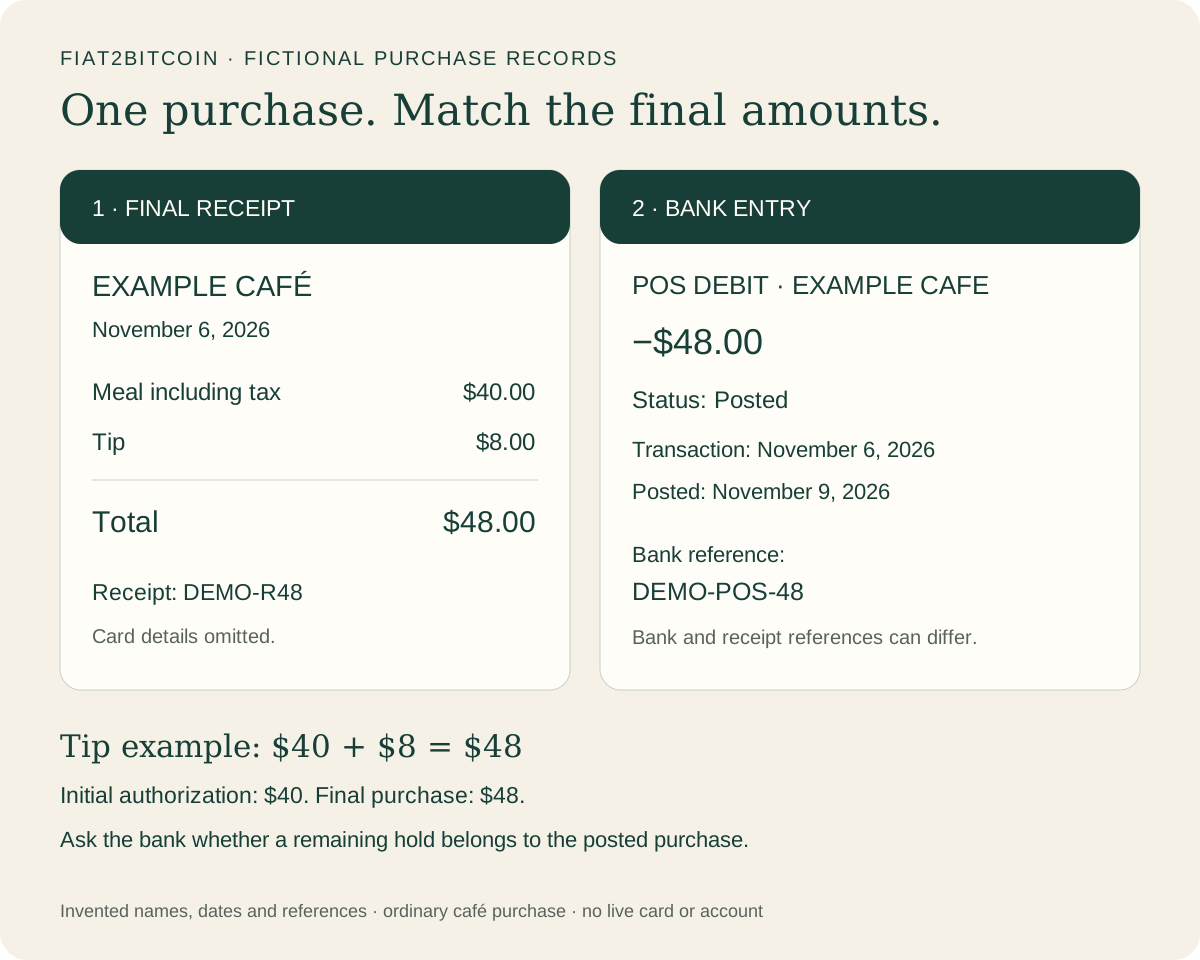
The illustration above pairs a fictional café receipt with its posted bank entry. Assume the receipt’s $40 meal amount already includes tax and the customer added an $8 tip. The final total is $48. Names, dates and references are invented, and card details are omitted.
Scroll across the table to see all columns.
| Check | Bank entry | Receipt or next step |
|---|---|---|
| Merchant | POS DEBIT · EXAMPLE CAFE | Receipt names Example Café. Compare the merchant’s billing name as well as its trading name. |
| Amount | −$48.00 | Meal including tax $40.00 + tip $8.00 = total $48.00. |
| Status | Posted | The final purchase has posted in this fictional bank record. |
| Dates | Transaction November 6; posted November 9, 2026 | Receipt dated November 6. Compare the transaction and posting dates separately. |
| References | DEMO-POS-48 | Receipt DEMO-R48. Keep both references; bank and merchant references can differ. |
| Card details | Omitted | Privately confirm the card used through the bank’s transaction details. |
If the bank shows a shortened or different merchant name, use the statement-descriptor guide to compare the billing label with the receipt. Stripe’s descriptor documentation explains how a billing description can combine business and transaction information, with some variation in what banks display.
POS purchase vs. POS withdrawal: why do the labels differ?
A bank may use wording such as POS debit, POS purchase, POS withdrawal or debit-card purchase for card activity. Helcim lists these among statement-description variations. Use the expanded details to identify the purchase, and ask your bank to explain an unclear transaction code.
Scroll across the table to see all columns.
| Label you see | What to check next |
|---|---|
| POS debit / POS purchase | Find the merchant, amount, card details and pending or posted status. |
| POS withdrawal | Check whether the bank identifies a card purchase and what the receipt includes. Ask the bank about any unclear cash component. |
| ATM withdrawal | Check the withdrawal location, time, amount and any fee against your cash-withdrawal records. |
| POS credit or refund | Confirm the direction of the entry and whether it relates to a merchant refund or another adjustment. |
A debit usually takes money from the account; a posted credit adds money to it. For an expected refund, match the incoming amount with the merchant’s refund confirmation and the original purchase. Follow up on the actual refund status if it has yet to appear.
How does a POS debit differ from ACH and DDA?
These labels describe different parts of a bank record. Nacha’s payment-network explanation distinguishes card payments from bank-account payments even when both use funds from a demand deposit account.
Scroll across the table to see all columns.
| Term | What it helps identify | Record to check |
|---|---|---|
| POS debit | Usually a debit-card purchase | Merchant receipt, card transaction details and authorization/posting status. |
| ACH debit | A payment collected through the ACH network with authorization | Originator details, debit authorization and any available ACH trace number. |
| DDA | A demand deposit account, commonly checking | The bank’s expanded record identifying the actual payment method. |
Our DDA debit guide covers generic account labels. For a transaction identified by the bank as ACH, use the ACH buying guide or ACH withdrawal guide to understand that payment route.
Why did a $40 pending purchase become a $48 POS debit?
In the fictional café example, the initial authorization is $40. The receipt shows an $8 tip, and the final purchase posts at $48. Capital One’s pending-debit explanation describes how a restaurant authorization can change when the tip is included.
The calculation is $40 + $8 = $48. When the bank confirms that the pending authorization belongs to this posted purchase, compare the final $48 with the receipt. Adding the $40 authorization to the $48 posted charge would produce $88 and count two stages of the same purchase.
A bank app may temporarily display a hold alongside a posted charge. Wells Fargo’s account-activity guidance explains how known authorizations affect available funds. Check the issuer’s treatment of the available balance and ask whether the hold is linked to the completed payment. If the final amount exceeds the receipt, ask the merchant to explain or correct it. The pending-transaction guide explains changing authorizations and holds.
Three situations and the next useful step
Start with the case that matches your records. These are fictional situations, with no live customer or provider information.
1. You recognize the purchase but the name looks different
Your online receipt shows a $48 payment to Example Store, while the bank displays the merchant’s billing name. Compare the order date, total and card used, then ask the merchant to confirm its statement description through a trusted contact method. Keep the receipt and bank reference together.
2. Two $48 entries appear
Read the status of each entry. If one is pending and one is posted, ask the bank whether they belong to the same purchase. If both have posted, gather both references and the receipt and ask the merchant to investigate. Contact the bank about its error-reporting process if the issue remains unresolved.
3. A $9.99 POS debit is unfamiliar
Check your receipts and authorized subscriptions, then ask the bank to identify the merchant and payment details. If you suspect an unauthorized charge, report it immediately through the bank’s official app or the number on your card. Ask how to secure the affected card and follow the bank’s reporting instructions. Save the case reference privately.
A checklist for checking a POS debit
Use this while looking at the entry in your banking app.
- Open the full transaction. Note the merchant, amount, status and both transaction and posting dates.
- Find the receipt or online order. Compare the final total, including any tax, tip or other disclosed component.
- Privately confirm the card or wallet payment method used. Keep full card numbers and security details out of public messages.
- If the amount changed, compare the final receipt with the posted charge and ask the merchant about any difference.
- For a possible duplicate, check each entry’s status and reference. Ask the bank whether an authorization is linked to the posted purchase.
- Report a suspected unauthorized payment promptly through your bank’s trusted channel, even if the amount is small.
- Keep the receipt, bank reference, case number and promised follow-up date so you can track the resolution.
What to ask your bank about an unfamiliar POS debit
You can use this question inside your bank’s secure support process: “My account shows a POS debit for [amount], dated [date], with reference [reference] and status [pending/posted]. Please identify the merchant and card transaction details. Is it linked to another authorization or posted charge? I [recognize/do not recognize] the purchase. What should I do next?”
For suspected unauthorized activity, use the bank’s urgent reporting channel. CFPB advises contacting the bank or card provider immediately. Its U.S. consumer guidance explains that reporting deadlines differ when the card is lost or stolen versus an unauthorized statement entry while you still have the card. Ask which deadline and reporting process apply to your case.
Common POS debit questions
Does POS mean I used a card in a physical store?
A bank’s POS label can cover debit-card activity from an online checkout too. Check the merchant and transaction details rather than deciding where the purchase happened from the abbreviation alone.
Is a POS debit a separate fee?
It usually labels the card purchase. Compare the amount with your receipt and look for any separate fee entry. Ask the merchant or issuer to explain an extra charge that you cannot match to the purchase.
How long will a POS debit stay pending?
Use your issuer’s estimate for that payment. Merchant submission and the transaction type affect posting. Ask the issuer about a hold lasting beyond its stated window, and check the merchant’s order status before repeating a payment.
Can I stop a POS debit after buying something?
For a purchase you authorized, ask the merchant about cancellation or a refund and ask the bank how it handles the associated authorization. For a suspected unauthorized payment, report it to the bank immediately. The next step depends on the transaction’s status and the issue you are reporting.
If the card purchase was for Bitcoin
Match the bank’s card entry with the actual purchase provider’s receipt and order reference. Our debit-card Bitcoin guide explains the steps from card authorization through wallet delivery. Use the statement-descriptor guide when the billing name differs from the website you remember.
Fiat2Bitcoin purchases remain unavailable while provider integration and launch checks are completed. Planned card buys use provider-hosted Paybis or Transak checkout; Fiat2Bitcoin receives neither purchase funds nor crypto. The café and shopping examples in this guide are ordinary fictional purchases.
Sources & further reading
General payment information and purchase-specific details serve different purposes. Review the current offer and terms before proceeding.
- Wells Fargo — Account activity, pending transactions and balances
- Helcim — POS debit and statement-description variations
- Capital One — Pending debit-card transactions
- Stripe — Statement descriptors
- Nacha — Pay by Bank FAQs and card-network distinctions
- CFPB — Reporting suspicious card activity promptly
Original Fiat2Bitcoin guide. Examples are illustrative; they are not live quotes or customer transactions. How we prepare our guides.