You receive Bitcoin several times and your wallet adds it all together. Later, the fee for sending it surprises you. The missing detail may be how many unspent outputs the wallet needs to use. You can understand that without learning to build raw transactions or connecting your wallet to a new website.
One balance can be made of different pieces
UTXO stands for unspent transaction output. The Bitcoin developer guide explains that a wallet balance adds up outputs that remain available to spend. Think of the pieces as different-value notes in a wallet, while remembering that Bitcoin uses digital transactions and signing conditions rather than physical notes.
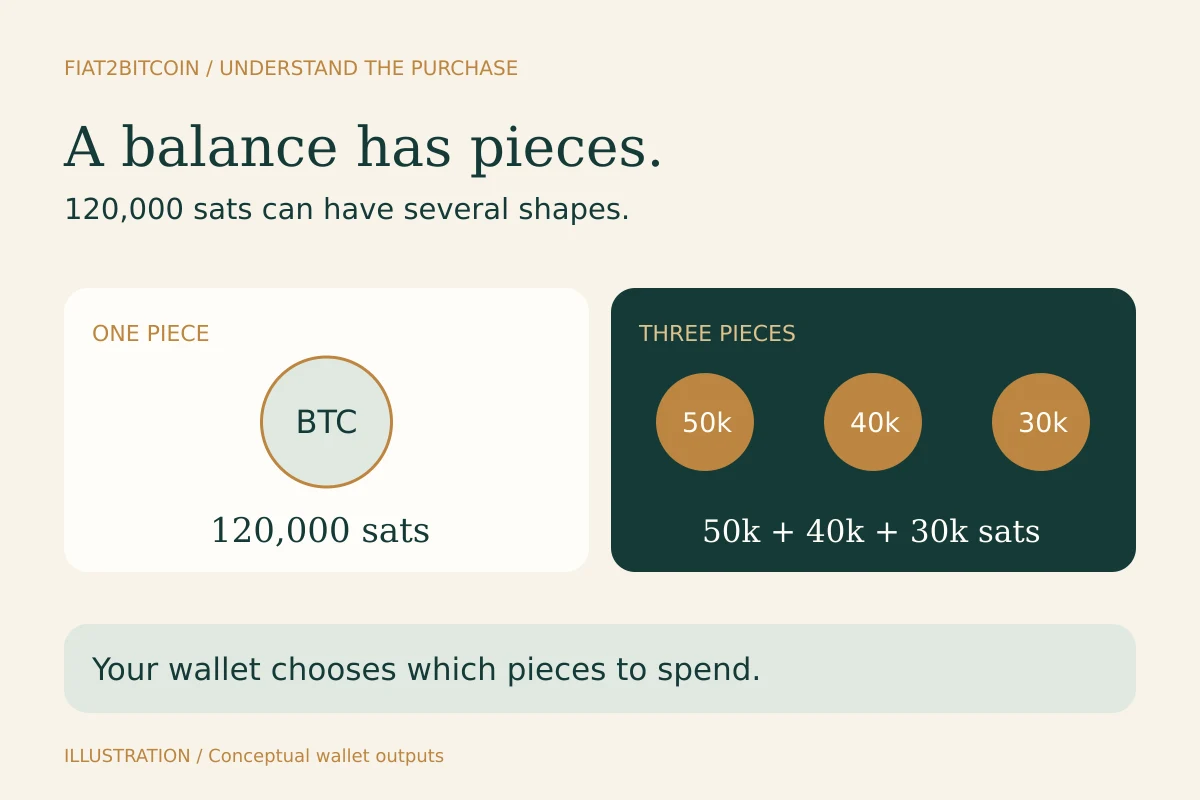
Two wallets can each display 120,000 sats. One might control a single 120,000-sat output. The other might control three outputs worth 50,000, 40,000 and 30,000 sats. Both totals are 0.00120000 BTC. How they fund a later payment can differ.
The number of addresses shown in your app is a different count. Reusing one receiving address can still create multiple outputs, and a wallet can manage outputs at many addresses. Its transaction list, receiving addresses and spendable outputs describe related but different records.
Follow a payment and its change
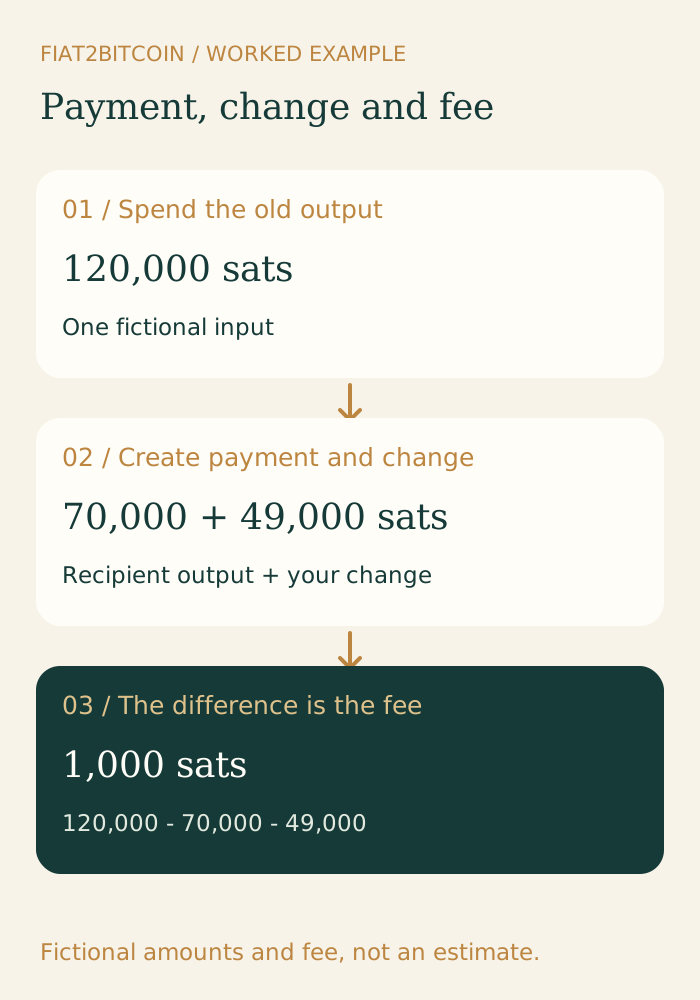
Here is an invented transaction using one 120,000-sat input. It sends 70,000 sats to the recipient and uses a hypothetical 1,000-sat network fee. The remaining 49,000 sats go back to the sender’s wallet as change. All values are fictional; the fee is not a current estimate.
Scroll across the table to see all columns.
| Part | Amount | What happens |
|---|---|---|
| Input used | 120,000 sats | The earlier output is spent in full. |
| Recipient output | 70,000 sats | Creates a new output for the recipient. |
| Change output | 49,000 sats | Creates a new output controlled by the sender’s wallet. |
| Network fee | 1,000 sats | The difference between the input total and output total. |
The sender has 49,000 sats left from this piece, rather than a partly spent version of the old 120,000-sat output. The Blockstream UTXO explanation describes this whole-output and change model. Your wallet normally handles the construction and change address for you.
Why the same payment can need a different fee
Use the network-fee calculator to turn your wallet’s rate and virtual size into a total. Its worked guide separates sat/vB, total sats and an optional dollar conversion.
Network fees depend on transaction size and fee rate. With comparable input types, adding more inputs usually adds more data. The amount sent in BTC is not the transaction’s data size. Your wallet’s actual construction, address/signature types and outputs affect the final size.
For a deliberately simplified illustration, assume a 140-virtual-byte transaction and a larger 700-virtual-byte transaction, both at 2 sats per virtual byte. Their fees would be 280 sats and 1,400 sats. Those sizes are assumed examples, not a prediction for a particular number of purchases or wallet. Changing the fee rate changes both results.
Bitcoin Optech’s coin-selection overview explains how wallets choose which outputs to spend. Your wallet may use only some of the pieces available, so having 20 outputs does not mean every outgoing payment spends all 20. Read the actual send preview before approving a transfer.
What this means for repeated small purchases
Each separate on-chain delivery to your wallet can add an output. Several deliveries from recurring purchases can therefore build up several pieces. A provider account that only updates an internal balance may not create an on-chain receipt for every buy; its later withdrawal is a separate event. Lightning payments also have a different transfer model.
A small output can become unattractive to spend when the cost of including it consumes much of its value. That depends on its type, the fee conditions and the wallet’s transaction construction. There is no single permanent ‘safe purchase size’ that fits every wallet and future fee rate.
Use the recurring-purchase planning guide to consider order charges and delivery together. Grouping withdrawals may reduce the number of on-chain receipts, but it also leaves funds with the provider for longer and depends on that service’s withdrawal rules.
Understand consolidation before moving anything
Consolidation means spending several outputs into fewer new outputs you control. It uses a real Bitcoin transaction and pays a fee now. Depending on future fees and how you later spend, it may reduce or increase your total lifetime cost. Compare the present preview with a realistic reason for moving the funds.
Combining outputs can also link their histories on the public blockchain. Outputs received for unrelated purposes may become associated when spent together. Keep that privacy tradeoff in view; reducing the number of pieces is only one consideration.
The Blockstream guide and your wallet’s own documentation explain its controls. Some wallets expose coin control; others choose inputs automatically. Read what a control does before changing it, and verify the receiving address on your signing device where supported.
A practical check you can do in your own wallet
Use the app or device you already trust. This guide needs no wallet connection, address upload, private key or recovery words.
- Confirm whether you hold native on-chain BTC or a balance on another service/network.
- Look for the wallet’s coins, UTXOs or coin-control view if its documentation says it supports one.
- Read the outgoing amount, selected inputs, fee rate, total fee and change in the transaction preview.
- Compare the fee with the amount you want to move. If you are only investigating, leave the transaction unapproved.
- Keep recovery words and signing keys offline and private; support can explain a fee without receiving either.
Keep purchase fees separate from later wallet spending
Your provider may charge for a purchase or a withdrawal. The network fee for spending your wallet’s outputs later is another event. Counting each event once helps you understand what the Bitcoin actually cost to acquire and use.
Start with network fees vs. withdrawal fees for the cost labels, changing receiving addresses for wallet privacy and your Bitcoin transaction ID for following a completed on-chain payment.
Sources & further reading
These sources explain the payment systems and rules discussed in this guide. For your purchase, check the provider’s current offer and terms.
- Bitcoin developer guide — Transaction inputs, outputs and fees
- Blockstream — UTXOs, change and wallet management
- Bitcoin Optech — Coin selection and privacy
Published by Fiat2Bitcoin. Worked examples use fictional figures and records; they are not current prices or customer transactions. How we prepare our guides.